
Why automate a LaTeX build#
LaTeX is my tool of choice for scientific writing: notes, papers, and my thesis all live in .tex files, with a large ecosystem of packages and templates behind them.
GitHub is where I keep those files under version control and collaborate on them.
Building the documents automatically on every push closes the loop: the compiled PDF is always up to date, and a broken build is caught immediately.
This post walks through a GitHub Actions workflow that compiles LaTeX documents, stores the resulting PDFs, commits them back to the repository, and caches dependencies to keep the build fast.
Build a basic workflow#
The first version of the workflow only checks out the repository with actions/checkout, then compiles it with xu-cheng/latex-action, which wraps latexmk in a container with a full TeX Live installation.
- 1
Check out the repository
Create
.github/workflows/build.ymlwith a single job that checks out the code on every push.name: Build LaTeX document on: [push] jobs: build_latex: runs-on: ubuntu-latest steps: - name: Set up Git repository uses: actions/checkout@v3 - 2
Compile the document
Add a
xu-cheng/latex-actionstep. It accepts the root file, the engine, and extralatexmkarguments. Heremain.texis compiled withlualatex, shell escape is enabled, and the output goes to the current directory.name: Build LaTeX document on: [push] jobs: build_latex: runs-on: ubuntu-latest steps: - name: Set up Git repository uses: actions/checkout@v3 - name: Compile main.tex uses: xu-cheng/latex-action@v2 with: root_file: "main.tex" latexmk_use_lualatex: true latexmk_shell_escape: true args: "-output-directory=." - 3
Choose an output directory
Keeping build products in a dedicated folder is tidier. Point
-output-directoryat./galleryto collect the PDFs there.name: Build LaTeX document on: [push] jobs: build_latex: runs-on: ubuntu-latest steps: - name: Set up Git repository uses: actions/checkout@v3 - name: Compile main.tex uses: xu-cheng/latex-action@v2 with: root_file: "main.tex" latexmk_use_lualatex: true latexmk_shell_escape: true args: "-output-directory=./gallery" - 4
Upload the PDF as an artifact
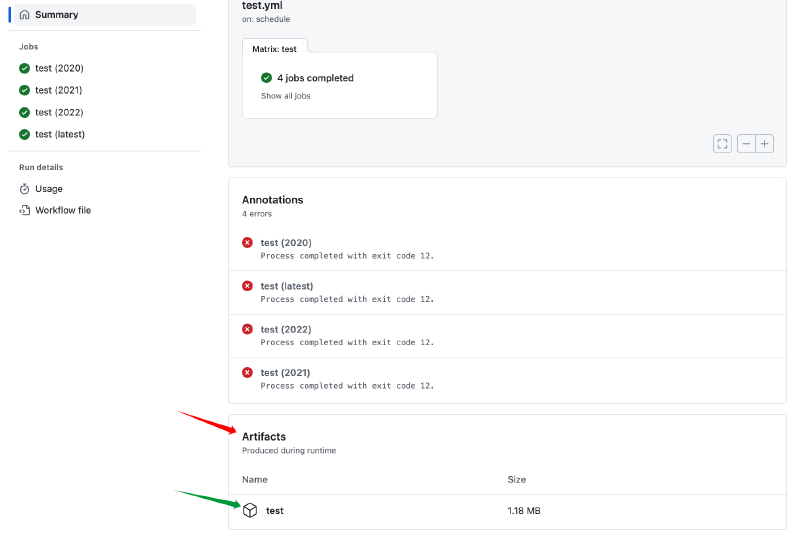
To keep a copy of every build, upload the PDF with
actions/upload-artifact. The file then appears in the artifact section of the workflow run.name: Build LaTeX document on: [push] jobs: build_latex: runs-on: ubuntu-latest steps: - name: Set up Git repository uses: actions/checkout@v3 - name: Compile main.tex uses: xu-cheng/latex-action@v2 with: root_file: "main.tex" latexmk_use_lualatex: true latexmk_shell_escape: true args: "-output-directory=." - name: Upload PDF file uses: actions/upload-artifact@v3 with: name: PDF path: main.pdf
The uploaded main.pdf can be downloaded from the run summary, as shown below.
Compile multiple documents#
The same action can compile several .tex files, including files in nested directories.
Set root_file to a glob and enable glob_root_file:
root_file: "source/*.tex"
glob_root_file: trueThe workflow below compiles both main.tex and every .tex file under source/, writing all output to ./gallery.
name: Build LaTeX document
on: [push]
jobs:
  build_latex:
    runs-on: ubuntu-latest
    steps:
      - name: Set up Git repository
        uses: actions/checkout@v3
- name: Compile main.tex
uses: xu-cheng/latex-action@v2
with:
root_file: "main.tex"
latexmk_use_lualatex: true
latexmk_shell_escape: true
args: "-output-directory=./gallery"
- name: Compile source/*.tex
uses: xu-cheng/latex-action@v2
with:
root_file: "source/*.tex"
glob_root_file: true
latexmk_use_lualatex: true
latexmk_shell_escape: true
args: "-output-directory=./gallery"Commit the build output#
The workflow can also commit the generated files back to the repository, so the PDFs in gallery/ always match the sources.
The commit is made with the built-in github-actions[bot] identity and pushed with ad-m/github-push-action.
name: Build LaTeX document
on: [push]
jobs:
  build_latex:
    runs-on: ubuntu-latest
    steps:
      - name: Set up Git repository
        uses: actions/checkout@v3

      - name: Compile main.tex
        uses: xu-cheng/latex-action@v2
        with:
          root_file: "main.tex"
          latexmk_use_lualatex: true
          latexmk_shell_escape: true
          args: "-output-directory=./gallery"
- name: Compile source/*.tex
uses: xu-cheng/latex-action@v2
with:
root_file: "source/*.tex"
glob_root_file: true
latexmk_use_lualatex: true
latexmk_shell_escape: true
args: "-output-directory=./gallery"
- name: Commit files
run: |
git config --local user.email "41898282+github-actions[bot]@users.noreply.github.com"
git config --local user.name "github-actions[bot]"
git status
git add .
git commit -m "update example and readme" -a
- name: Push changes
uses: ad-m/github-push-action@master
with:
github_token: ${{ secrets.GITHUB_TOKEN }}
branch: mainCache dependencies#
Finally, actions/cache shortens the run time by restoring the TeX tree and the auxiliary files from previous builds.
The cache keys are derived from the hash of all .tex files, so the cache is refreshed whenever the sources change.
name: Build LaTeX document
on: [push]
jobs:
  build_latex:
    runs-on: ubuntu-latest
    steps:
      - name: Set up Git repository
        uses: actions/checkout@v3

      - name: Cache LaTeX dependencies
        uses: actions/cache@v3
        with:
          path: /usr/local/share/texmf
          key: ${{ runner.os }}-texmf-${{ hashFiles('**/*.tex') }}

      - name: Cache auxiliary files
        uses: actions/cache@v3
        with:
          path: ./gallery
          key: ${{ runner.os }}-auxfiles-${{ hashFiles('**/*.tex') }}
          restore-keys: |
            ${{ runner.os }}-auxfiles-

      - name: Compile main.tex
        uses: xu-cheng/latex-action@v2
        with:
          root_file: "main.tex"
          latexmk_use_lualatex: true
          latexmk_shell_escape: true
          args: "-output-directory=./gallery"

      - name: Compile source/*.tex
        uses: xu-cheng/latex-action@v2
        with:
          root_file: "source/*.tex"
          glob_root_file: true
          latexmk_use_lualatex: true
          latexmk_shell_escape: true
          args: "-output-directory=./gallery"

      - name: Commit files
        run: |
          git config --local user.email "41898282+github-actions[bot]@users.noreply.github.com"
          git config --local user.name "github-actions[bot]"
          git status
          git add .
          git commit -m "update example and readme" -a

      - name: Push changes
        uses: ad-m/github-push-action@master
        with:
          github_token: ${{ secrets.GITHUB_TOKEN }}
branch: mainExamples#
These workflows are a starting point rather than a finished product; adapt them to your own repository layout. Two of my repositories use this setup: